
OT cybersecurity assurance platform
Architecture-aware OT cybersecurity assurance.
OTReady connects OT architecture, IEC 62443 and NIS2 assessments, governed Findings, Evidence, remediation and issued reporting in one traceable platform, so an assessment result always points back to the part of the plant it is actually about.
No account required to start.

- Architecture-aware
- Assessment-first
- Vendor-neutral
- Connected Assurance optional
Build the business case with your own numbers
Start with the free OT Assurance Cost Snapshot, then continue into the full OTReady business case and OT cyber-risk ROSI model.
All three calculators are free. No account or login required.
Start immediately with the Cost Snapshot. Leave your work details once to unlock both advanced tools.
Verticals
Your sector. Your terminology. Your architecture.
OTReady is not a per-sector product with six separate editions. It is one model that carries your sector's context, domains and vocabulary, with demonstrated use cases where we have built them, and honest labels where we have not.

Utilities
Available use case / demoSubstations, regional distribution and utility OT environments.

Manufacturing
Available use case / demoProduction lines, cells and plant-wide OT environments.

Process Industries
Configurable todayContinuous and batch process environments across refining, petrochemical, chemical and related industries.

Material Handling & Ports
Available use case / demoTerminal, crane, conveyor, yard and material-handling operations.

Rail
Configurable todayDedicated rail accelerator: plannedRail infrastructure, depots and distributed operational environments.

Your industry / Custom OT environment
Configurable / availableCustomer-defined OT structures and terminology without forcing a predefined sector model.
Start blank, and the platform still works the same way.
- Start blank
- Define your Sector Context
- Define your OT Domains
- Build or import your Architecture
- Run the same assessments, assurance, remediation and reports
The OTReady approach
From OT architecture to assurance.
Most OT security tooling starts at the questionnaire. OTReady starts one step earlier, at the architecture the questions are about, so every risk, requirement, Finding and remediation task stays attached to a real Site, Zone, Conduit or Channel.
01
Context
Sector context, OT domains and the entity's own terminology.
02
Architecture
Sites, Zones, Subzones, Conduits and Communication Channels.
03
Risk
Initial screening and IEC 62443-3-2 risk scenarios.
04
Targets
Target Security Levels proposed, then explicitly confirmed.
05
Assessments
IEC 62443-3-3, NIS2 Quick Scan and NIS2 Full Readiness.
06
Findings & Evidence
Governed Findings, each with its evidence and provenance.
07
Remediation
Treatment, tasks, review and governed closure.
08
Reports
Human-readable reports, issued as immutable versions.
Architecture
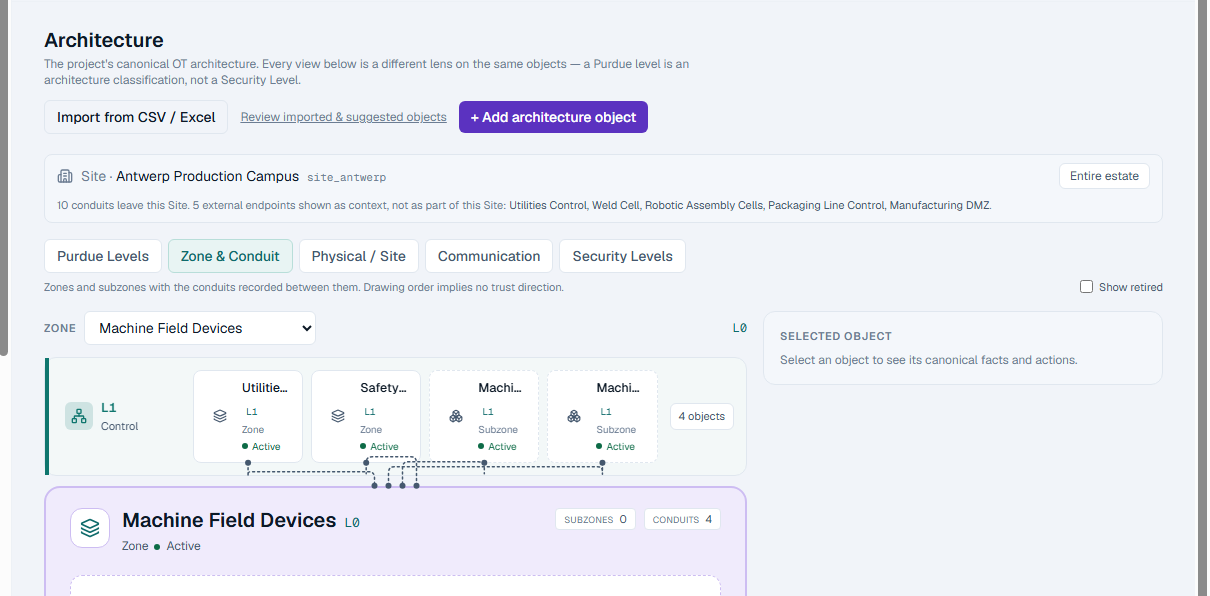
Architecture is the context assessments should refer to.
An assessment result that cannot name the zone it applies to is difficult to defend and impossible to maintain. OTReady models the plant first, as canonical objects with stable identity, and every later judgement targets one of them.
- Site
- Zone / Subzone
- Conduit
- Communication Channel
- Sites, Zones and Subzones with their own canonical identity
- Purdue level as an architecture classification, never as a Security Level
- Conduits between scopes, and the Communication Channels inside them
- Assets, interfaces and locators
A Conduit is not a Communication Channel.
Conduit
The security relationship between two scopes.
Communication Channel
The actual communication carried inside that Conduit: protocol, direction, medium and whether encryption was recorded.
Assessments
The assessments an OT asset owner actually has to run.
Four assessment modules, each scoped to the architecture you have already modelled. Partial assessment is a deliberate strength: start with one and it unlocks what it legitimately can.
IEC 62443-3-2
AvailableRisk assessment for the zones and conduits in scope.
Target Security Levels (SL-T)
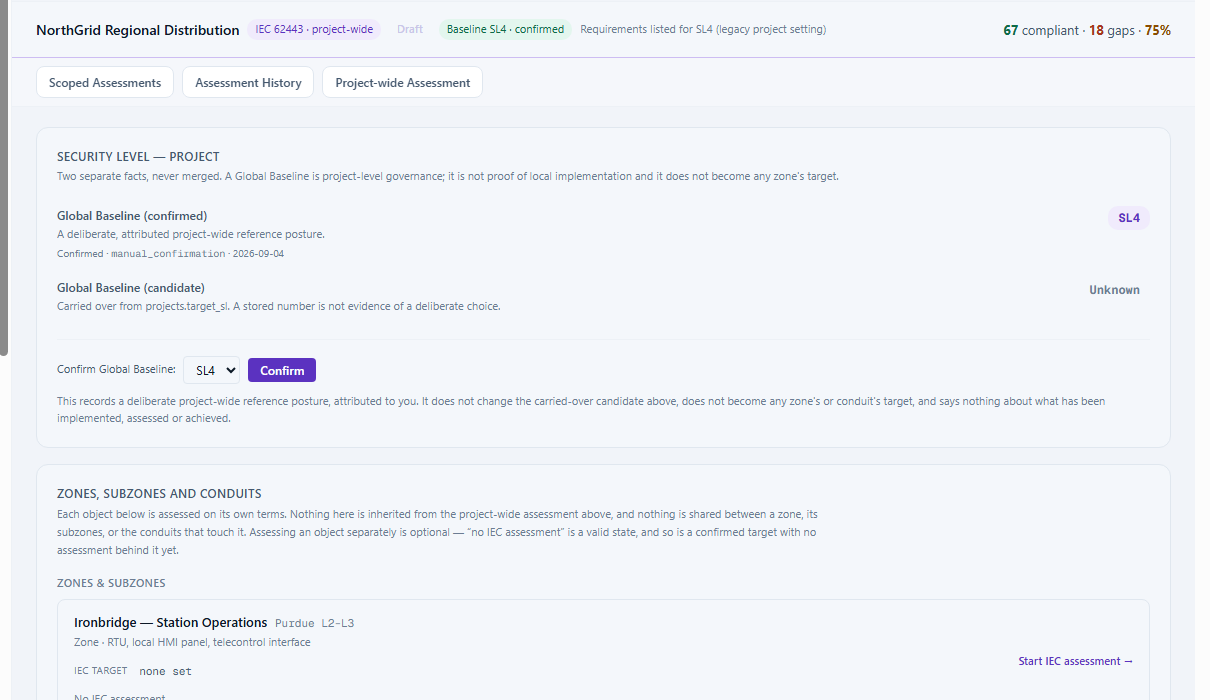
AvailableA proposal is not a decision. A target becomes authoritative only when someone confirms it.
IEC 62443-3-3
AvailableSystem requirements, assessed project-wide or against one scope.
NIS2
AvailableA short Quick Scan, or the full evidence-gated readiness assessment.
OTReady produces readiness and audit-ready evidence. It is not a certification body, and no score, mapping or issued report constitutes legal compliance.
Assurance
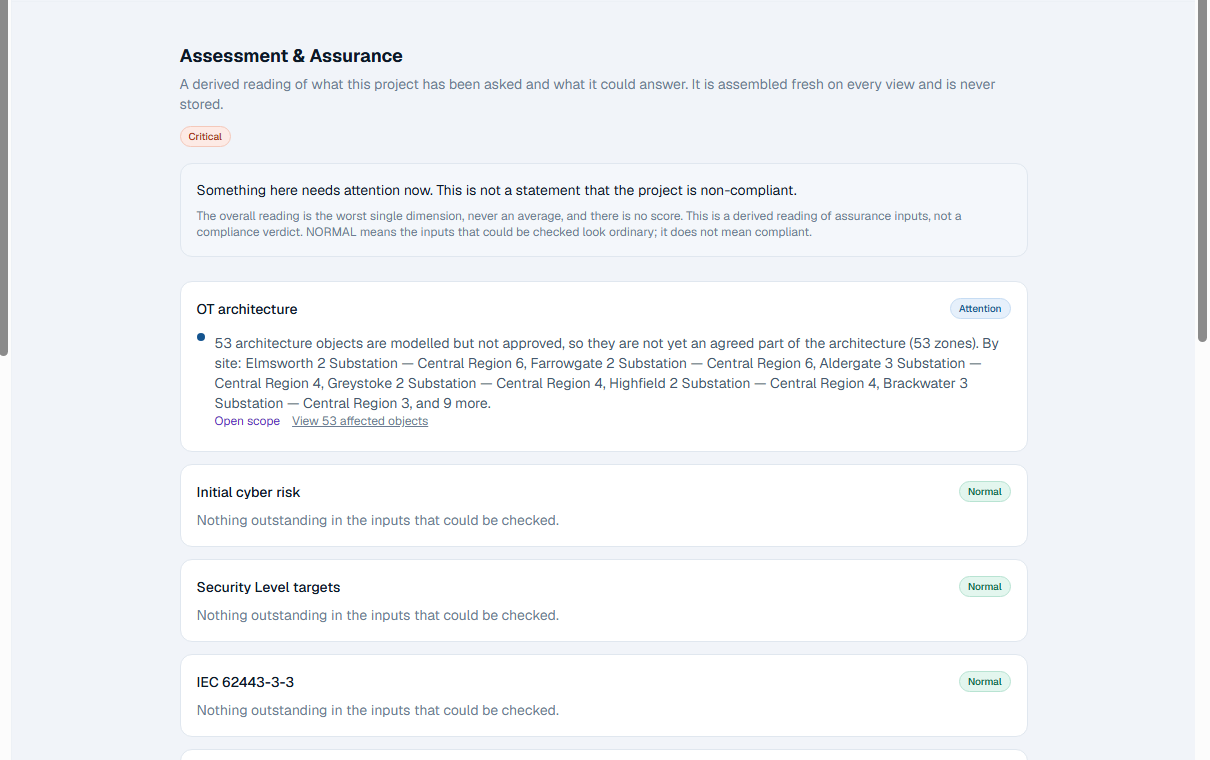
One derived reading of what this project has been asked, and what it could answer.
The cockpit is assembled fresh on every view and is never stored. It reports the worst single dimension rather than an average, and it deliberately produces no score: one number would let a well-modelled architecture compensate for a risk posture nobody has assessed.
- Normal
- Attention
- Degraded
- Critical
- Unknown
Unknown is never a quiet Normal, and a technical read failure is never dressed up as Unknown. A broken read is reported loudly as a defect, because a grey panel over an outage is the most convincing wrong answer a dashboard can give.
Remediation
Turn Findings into governed remediation work.
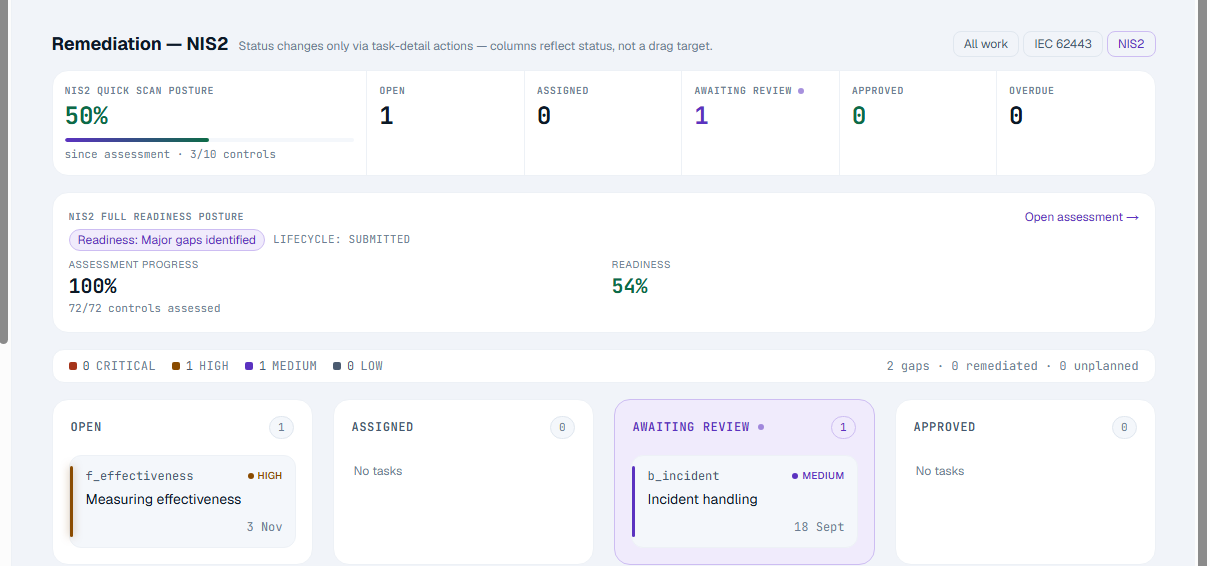
A Finding that nobody owns is a Finding that survives to the next audit. OTReady carries a Finding through an explicit treatment decision into tracked work, and closes it only when the work has actually been reviewed.
- Finding
- Treatment
- Task
- Assigned
- Awaiting review
- Approved
- Finding closure
OTReady has no native ticketing integration today. Work is tracked on its own board; a generic API path exists for connecting other systems.
Import & Integrations
Your architecture already exists. Bring it in without retyping it.
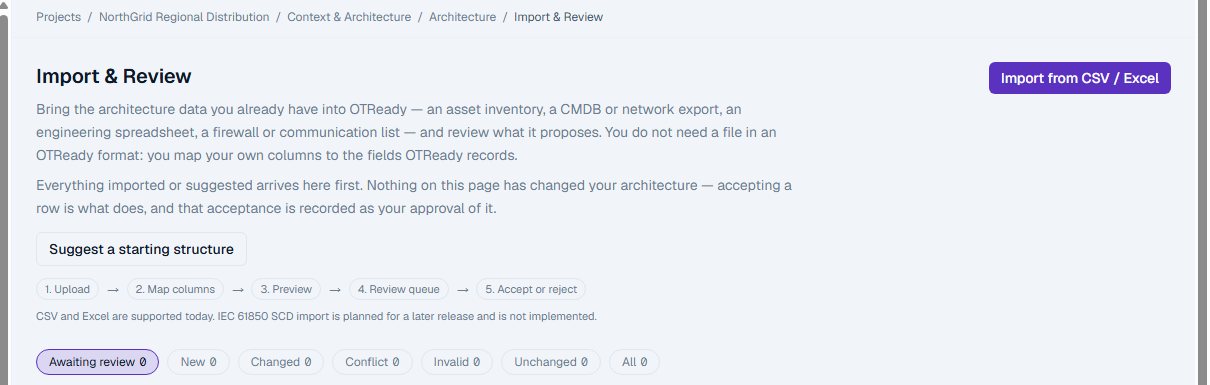
Most asset owners already hold their architecture in a spreadsheet, a CMDB export or an engineering list. OTReady imports it through a review queue, because a file is an observation about a plant, and only a person can turn that into agreed architecture.
- 01
Upload
CSV or Excel, read without silent truncation.
- 02
Map
Your columns, mapped to canonical fields.
- 03
Preview
See what would be created before anything is.
- 04
Candidates
Every row becomes a reviewable candidate, including the invalid ones.
- 05
Review
Accept, correct, reject, or resolve a match.
- 06
Accept
Acceptance is the only step that writes canonical architecture.
Connected Assurance: optional enrichment
- NDR / IDS
- SIEM
- CMDB
- API / Other
No native vendor connector exists today. The planned items above are named as intentions, not as partnerships or endorsements.
Reports & governance
A report someone keeps should still say the same thing next year.
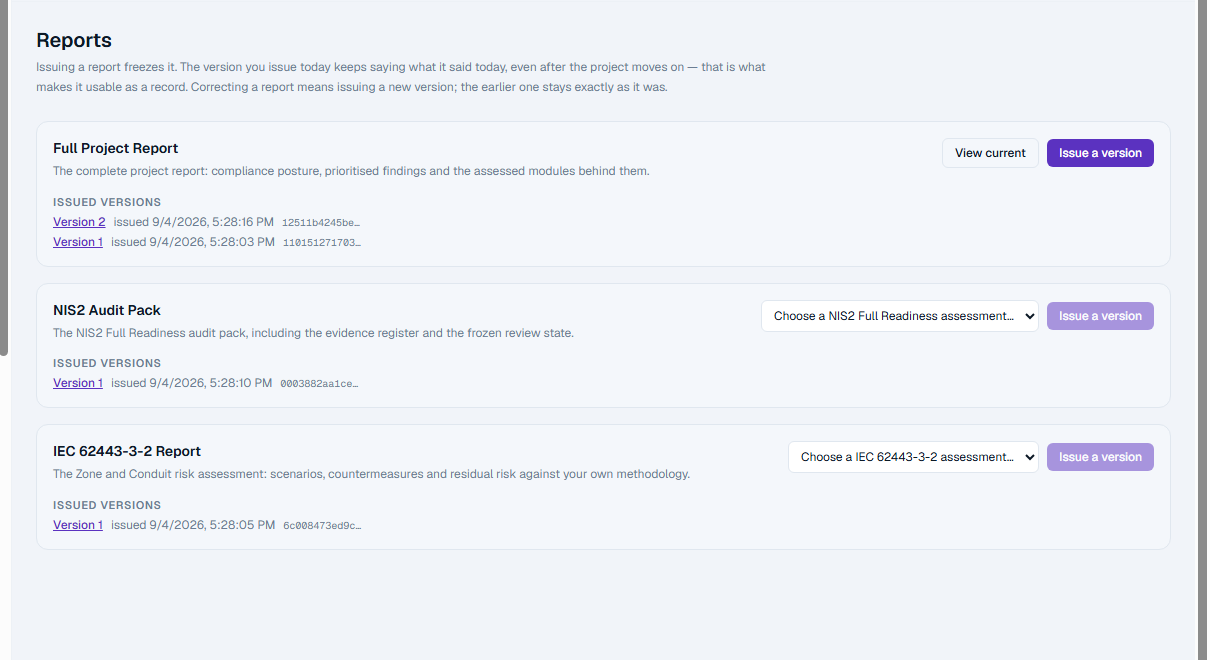
OTReady issues reports as immutable versions. Correcting something produces version 2; version 1 remains exactly what it was, because a document that quietly rewrites itself is worse than no document.
- Full Project Report
- NIS2 Audit Pack
- IEC 62443-3-2 Report
Issued means frozen. An issued version records its number, its digest, who issued it and when.
Understand. Assess. Assure.
Bring structure to OT cybersecurity assurance.
See OTReady against your own architecture: your sites, your zones, your conduits, and the assessments you are actually being asked for.